Payment Flows
In this section, you will gain an understanding of the payment process employed by PayU. This process encompasses a sequence of activities that cover the entire lifecycle of a transaction, from initiation to completion.
There are two stages to processing a basic payment flow via PayU.
- The buyer places an order on your webpage.
- PayU confirms that the payment has been processed successfully.
Stage 1: Buyer Places an Order
The first stage begins when a buyer places an order on your webpage. They select the desired products or services and proceed to the checkout process. At the checkout, the buyer enters their payment details, such as credit card information or other preferred payment methods.
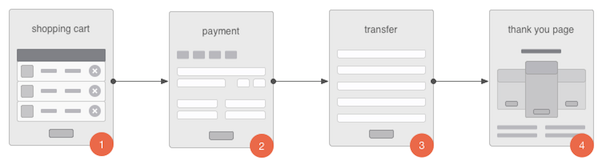
- The buyer clicks on a button that is linked to the PayU payment service.
- The PayU system presents an order summary webpage, where the buyer confirms the payment and is then redirected to a bank website.
- The buyer accepts the payment on the bank website. The buyer is redirected back to the PayU system.
- PayU redirects the buyer to your website via the provided
continueUrl. - Your system confirms that the transaction was successful and presents the "Thank You" page to the buyer.
Stage 2: Payment Capture (optional)
The PayU system actively notifies your system whenever there is a change in the payment order status as per its lifecycle. This notification is sent to keep you informed about the progress of the payment and to provide real-time updates on the transaction.
Upon receiving the notification, your system should confirm the receipt of the update. This confirmation is crucial, as it ensures that you have acknowledged the change in the payment order status and are aware of the latest developments in the payment process.
You can make it even easier for your customers to pay for your services or goods. For more information, see the Build Your Own Checkout page.
Current payment status is also available in the management panel.
Payment Lifecycle
Each payment in the PayU system has a lifecycle, which is comprised of stages related to key events such as acceptance, settlement, and cancellation.
Authorize and Order
Learn how to communicate with the PayU system, how to authenticate, and to send requests.
Capture and Cancel
With PayU, any successful payments made are automatically captured, and the corresponding funds are added to the balance of the relevant shop. However, if you prefer, you have the option to disable the auto-receive feature.
Refunds
With PayU, you can easily process refunds for payments that have been successfully completed. When a refund is initiated, the system ensures an efficient transfer of the refunded amount directly to the buyer's account.
Retrieving Transaction Data
The transaction data retrieval serves as a valuable tool to retrieve transaction details associated with a specific orderId. This functionality allows you to access essential information such as bank account details or card details used in the transaction.